

Insta Pro 3♕
Insta Pro 3 is a version of the widely used social network application Instagram. This is a service aimed at users who seek additional control on the web. The application maintains the same design as Instagram. It also includes some features and settings to provide browsing options.
An interesting characteristic is its ability to support media saving. Users can save any media such as photos, videos, stories, or reels on their devices. This feature might come in handy if one wants to look through media later. Different options to download media with various qualities are offered by the application. It provides additional options is privacy settings.
The app enables users to hide their online statuses. Typing and seen indicators can be hidden. There is an option to see the stories of friends without making your presence known.
Overview of Insta Pro 3 App
Moreover, there is also more control in regard to shared content. There are features that allow users to copy captions, comments, and profile information. Such a feature is handy in case someone wants to save some information for themselves later. The Insta Pro APK Download can make some of the frequent operations faster. It is possible that there will be some customization.
Users have an opportunity to personalize some elements of the application interface. Various themes, colors, fonts, and other options can add a new layer of personalization. It is best for people who like customizing apps. One more handy feature is large previews of profile pictures. It is possible for users have an opportunity to preview profile pictures in a larger format. This makes small images more visible. insta pro apk will also have additional options regarding stories and reels.
What is Insta Pro 3 APK?
It is possible to use Insta Pro 3 APK with multiple accounts. This is useful for those users who have both personal and professional accounts. They will find switching between them less troublesome. People are able to have various profiles open without reentering their account data. The application can offer more message-related options. Some modifications have anti-delete features for messages. They can ensure users have access to messages that have been deleted by someone else.
Additional chat settings give people more flexibility during their daily communication. A key feature is its emphasis on providing a clean browsing experience. Its user interface is meant to stay unchanged while offering some extra settings. The application offers standard social networking options. While giving users some additional possibilities. Users have to be careful when using such modified applications like insta Pro 3 APK Download .
Why Should You Use Insta Pro 3 Application?
- It also has added privacy settings for a more personal web experience.
- One can store photos, videos, reels, and stories for future viewing.
- There are some helpful settings. These assist one in staying anonymous online and typing status.
- Theme customization will allow users to make the application look more pleasant.
- Supporting several accounts is an option to simplify the process of switching profiles.
- Users have the opportunity to copy things such as captions and comments.
- Profile picture zoom will help to see small profile pictures better.
- Additional story settings will give flexibility to content browsing.
- Downloading settings will be handy in accessing media one has stored.
- Several customization options allow users to set the application according to their preferences.
- It will be more convenient to chat thanks to messaging settings.
- A similar user-friendly interface makes it easier to use for those who are used to social networks.
- Insta Pro 3 Mod App provides more control over the usage of social media than a standard app.
- Several additional settings allow one to personalize different aspects of the application.
Comparison Between Insta Pro 3 Mod APK and Instagram
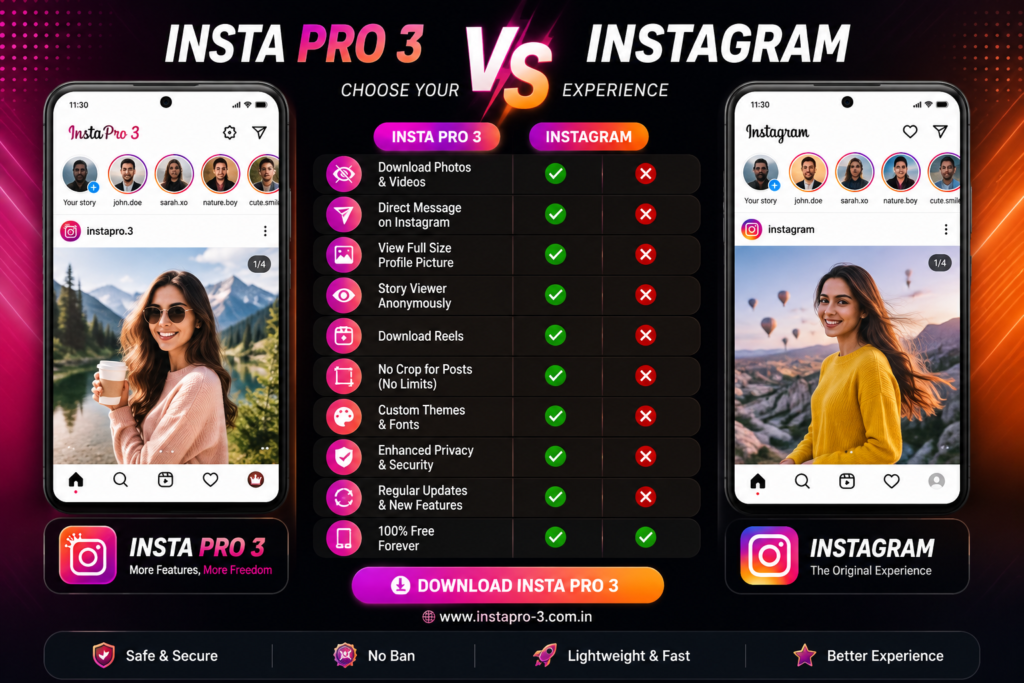
A similar social media experience is found in insta pro apk download old version and Instagram. But still, their toolset varies in some way. Pro Version and Instagram have various features. But the official one comes with regular updates and the trustfulness of the platform. Instagram allows posting updates, viewing reels, following creators, sending messages, and viewing stories. Pro includes additional features for people who want more freedom in browsing. It is related to downloading content, viewing profile pictures, and theme customization. On the other hand, Instagram offers official support and adheres to platform policy. Installation of the Pro version is carried out from unofficial sources. This can cause some security and account issues. Hence, Instagram is better for users who need official and stable service.
How to Use the Insta Pro 3 Old Version?
- Download the Insta Pro 3 old version from a reliable source.
- Install the software on your compatible Android smartphone.
- Start using the app once it is installed.
- Provide your Instagram login details to log in.
- Review the homepage and see various features.
- Explore the posts, reels, stories, and profiles in the normal fashion.
- Go to the privacy menu to configure visibility options.
- Choose appropriate options for your online and typing statuses.
- Use the download feature to save compatible media.
- Use themes to customize your app’s look and feel.
- Make use of the profile zoom feature while looking at pictures.
- Copy the caption or comments if necessary.
- Control your multiple accounts using account settings.
- Change notification settings according to your preference.
- Do not provide permissions beyond the needs of the application.
- Do not give sensitive information if the source is not reliable.
Follow Instagram guidelines and keep your login details safe
Best Alternatives to The Insta Pro MOD APK
Insta Pro
Insta Pro APK Download Latest Version is one of the most common alternatives. It is for those users who seek additional functions when surfing the social network. It is able to offer the option to download media content, such as images, videos, reels, and stories. The privacy functions are helpful in controlling the user’s online presence. Using custom themes allows you to make the interface look different. The multi-account feature may assist in managing profiles better.
GB Instagram
Another alternative is GB Instagram. This modified version offers more personalized and private options. Individuals can have access to options for downloading various media on their devices. More advanced settings are available to control story viewing and message notifications. The app offers the user various themes and other interface modifications. Those who like customizing their social media apps. They can use it for its personalization options. It has an intuitive interface for easy navigation.
Aeroinsta
The media saving features enable users to save their preferred pictures and stories. Privacy settings allow them to gain better control over how visible or private their posts will be. There are features where users can change the themes, fonts, and other aspects. All of this allows Aeroinsta to be an interesting choice.
Honista
Honista is a social media app. This is modified and is famous for having various customization and privacy settings. Various options are available in this application. Such as media download, profile picture preview, caption copy, and story management. Theme setting is an option through which one can modify the whole look of the interface. The multiple account option will help one to switch between various profiles easily.
Why is the Insta Pro 3 MOD Version Better Than Other Apps?
- It gives more privacy options while browsing.
- Users have the ability to save photos, videos, reels, and stories.
- More customizations give Insta Pro 3 Mod App APK a personalized interface.
- Support for multiple accounts is more convenient for users.
- Zooming on the profile pictures gives a clear view.
- Copying captions and comments saves text quickly.
- Additional controls on stories give more browsing freedom.
- Different themes give users the choice to customize their apps.
- Settings related to messaging give more control over messages.
- Easy navigation due to its familiar interface.
- Users can avoid using additional applications by using media saving tools.
- Privacy settings give a better experience while social browsing.
- Different sections of the interface can be customized by users.
More additional features give more flexibility than a basic one
Insta Pro 3 for Android
You can easily install this application on your Android device. Without facing any problems at all. In order to do so, go to our website via your mobile phone. And click the download button and Insta Pro 3 download satrt. After that, we will require you to give permission to download this app. Then the download process will start in a few minutes. After that, download this app in your mobile phone. And use it to download reels from Instagram.
Insta Pro 3 for iOS
Users can also go to our website to download this app on their iOS devices. Users can easily download the iOS version of this application via our website. Firstly, users have to open the website and download the Insta Pro 3 App for iOS on their iPhone. Users cannot install any third-party application on their iOS devices directly. To do so, users need to use Trollstore.
Insta Pro 3 for PC
The same software can also be used on your PC or Windows device for downloading videos. In order to perform this task, some people might need an emulator such as BlueStacks. Another thing that one can do is use the LDP layer to use this application in his PC or Windows device. All the emulators contain a search bar, using which one can find everything very easily. It becomes quite convenient for everyone. Find our website through the search bar and then download this application. Now install the Insta Pro 3 Application for PC in your PC or Windows.

Features of Insta Pro APK 3
Media Downloading
It provides an easy way to save photos and videos on your mobile device. Such a feature is useful. Because it allows saving interesting materials for viewing at a convenient time. The saved material is viewed via the gallery or file manager. Insta Pro Mod Version is easier for users to sort out their favorite media. Downloading features may differ depending on versions.
Reel Saving
This feature enables the user to save entertaining or educational videos. Instead of going through the trouble of looking for the same reel over again. One can opt to save the reel on their device. It is usually a straightforward and easy task to do. Availability will depend on the version of the app. One must observe the copyright law when downloading.
Story Downloading
The story downloading function lets users download supported photographs and videos. That are posted in the stories format. Such files are available for viewing even when the original story is not available. This functionality allows users to preserve memorable or valuable moments. The availability of a download button would simplify the whole procedure.
Profile Picture Zoom
This profile picture zoom feature allows users to view profile images in a larger size. Small pictures can sometimes make it difficult to notice details. This option may help users see images more clearly without relying on a separate tool. The viewing process is simple and convenient with this Insta Pro 3 Mod Application. Availability depends on the version being used.
Privacy Controls
Privacy settings offer additional options for controlling some operations performed within the application. There are settings such as online availability, story viewing, and notification of messages. Privacy settings may provide more options when browsing. There are plenty of options that can be reviewed and used accordingly.
Online Status Hiding
Users can use the status hiding option to hide themselves from other individuals. In that case, users could browse for content without being visible to others. It may give them more privacy and comfort. The functionality may differ based on the version. Users should review the options available in their application version. The online status hiding is unpredictable.
Typing Indicator Hiding
It ensures that other users do not know whether someone is typing out a message. The above feature will offer some form of control. When it comes to visibility of activity during a conversation. It is useful to a user when he or she wants to have sufficient time to formulate a proper response. Insta Pro Mod APK only works depending on the version installed.
Seen Status Control
This enables you to determine the visibility of your message-reading. There is an option for certain versions. Where the settings aim to make read indicators invisible in direct messages. This enables users to have more freedom in reading their messages. The feature does not always work. Modified applications do not necessarily behave according to the platform.
Caption Copying
Copying captions is useful for copying text from the post’s caption. It is helpful while saving information. Noting down something, or reading the caption in other languages. Users can use the copied text rather than typing it all down themselves. Copying the captions can save time for the user while browsing. Remember to give due credit to the writer where needed.
Comment Copying
The ability to copy comments enables users to copy the text from comments left under posts or videos. This is useful in storing useful advice or information. That is beneficial in the future. Insta Pro Free Version is used when copying a comment that is interesting or has provided an answer to one’s question.
Custom Themes
Custom Themes enable users to alter the look of the software program. Various colors, backgrounds, and interfaces will depend upon the particular version used. The use of such features can provide users with a personalized experience. That makes surfing fun and more enjoyable. Users have the freedom to choose their preferred look.
Font Customization
The option of changing the fonts allows you to personalize the font in areas that allow it. The choice of different fonts will result in a personalized view. It will also be comfortable for viewing for some users. It may be important for those individuals who like their text in a certain way. The available fonts will differ from the version used.
Multiple Account Support
Handling multiple accounts may facilitate the management of several social media accounts. One can maintain personal, professional, or creative accounts on the same device. Accessing different accounts will minimize the number of times. One would need to log in to the account. This facility is useful for individuals who handle various activities on the Internet with this Insta Pro APK.
High-Quality Media Saving
Saving good quality media means saving pictures and videos in high definition. Whenever there is a choice to download it in better quality. It helps to keep the details, coloring, and clarity of images intact. This is helpful whenever you wish to preserve your personal memories or watch media. The end result depends upon the quality of the uploaded content.
Pros & Cons
Pros
- It enables users to download images, videos, and stories.
- It gets rid of many ads for more comfortable browsing.
- Additional features for extra privacy are provided by the application. Such as the option to keep your online status and typing indicators private.
- Additionally, users can change their themes.
- The ability to upload media in high-quality format is available in the application.
- It is very easy to navigate through this app.
- The Insta Pro 3 APP APK provides the easiest way to save your stories.
- An in-built media player opens your videos instantly.
- It helps you save your favorite content in no time.
- If you prefer a simpler layout, you can view posts in that layout.
- Some versions have enhanced notification control.
Cons
- The app is not supported by the official Google Play Store.
- Users need to download the app from third-party sites; this can be risky.
- The app installation includes malware risks.

How to Download and Install the Insta Pro 3 Updated Version?
This Insta Pro 3 APK Latest Version is rich in features. This is perfect for users who require more features on their smartphones. These additional features are useful to use of your smartphone more convenient. You will find that using social networking sites through your smartphone is more fun. This is a good choice for getting apps from trusted sources. Our site is 100 percent safe for users.
- Open our website.
- Click on the download button.
- It requires permission to install an APK file.
- Grant permission to download the application.
- Upon granting permission, the download process of the APK file starts.
- This results in placing the APK file on your device.
- Click on the APK file for the installation of the application.
- A pop-up will show up on the screen. It will ask you to install the application on your device.
- Permission is required to install the application from unknown sources.
- Give the required permission.
- The process of installing the application on your device will begin.
- In no time, the application will be installed on your device.
- Open the application, register yourself, and enjoy additional features.
FAQs
Conclusion
In summary, it is the modified version of the actual Instagram app. There are lots of extra features in this app that you do not find in the actual app. This is an app intended for those who wish to have a lot of control. The Insta Pro 3 latest version has features like downloading photos, videos, reels, and stories. The app enables you to download content so that you can view it even when offline. This app has privacy options. There are no advertisements in the app as well. The app has an easy-to-use and user-friendly interface. This makes it possible for everyone to use this app easily. There are many customization options on the app as well. Many themes, fonts, and colors are available on this app. People love the feature of hiding their online presence and uploading quality media.